
In the digital age, information is everywhere. Articles, videos, social media posts, PDFs, images, tweets, and links surround us every day. While access to information has never been easier, organizing and sharing that information effectively remains a challenge. This is where Wakelet comes in.
Wakelet is a powerful yet simple content curation platform designed to help individuals, educators, students, businesses, and teams collect, organize, and share digital content in one place. Whether you are a teacher creating lesson resources, a student managing research, or a professional building knowledge hubs, Wakelet offers an intuitive solution.
In this in-depth article, we will explore what Wakelet is, how it works, its features, benefits, limitations, and real-world use cases, so you can decide whether it’s the right tool for you.
What Is Wakelet?
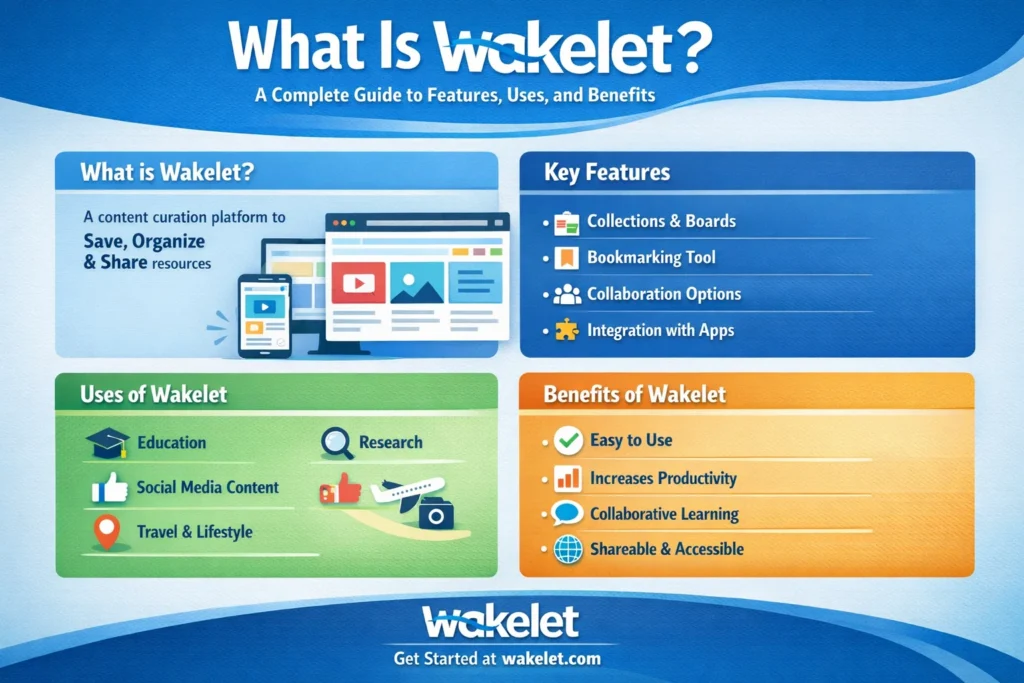
Wakelet is a free content curation and organization platform that allows users to save, organize, and share content from across the web in visually appealing collections. These collections can include:
Articles and website links
YouTube videos and other media
Social media posts (such as tweets)
PDFs and documents
Images and text notes
Original content created by the user
Instead of bookmarking content in multiple places, Wakelet lets you centralize everything in one structured, shareable space.
A Brief History of Wakelet
Wakelet was founded in 2014 in the United Kingdom. Initially launched as a bookmarking and content-saving tool, it gradually evolved into a full-featured curation and collaboration platform.
Over the years, Wakelet gained popularity especially among:
Educators
Students
Content creators
Knowledge workers
Its clean design, free access, and education-friendly approach helped it grow globally.
How Does Wakelet Work?
Wakelet works around the idea of collections.
Step-by-Step Overview:
Create an Account
You can sign up using email or existing accounts like Google or Microsoft.
Create a Collection
A collection is like a digital folder where you store related content.
Add Content
Add links, upload files, write notes, embed videos, or import social media posts.
Organize & Customize
Rearrange items, add titles, descriptions, and cover images.
Share or Collaborate
Share collections publicly, privately, or invite collaborators.
Key Features of Wakelet
Wakelet stands out because of its simplicity combined with powerful functionality.
- Content Curation from Anywhere
Wakelet allows you to save content from almost anywhere on the internet:
Blogs and news articles
YouTube videos
Tweets and social posts
PDFs and Google Docs
This makes it ideal for research and resource management.
- Visual and Clean Design
Wakelet collections are visually appealing:
Grid and media layouts
Clean typography
Easy navigation
This makes collections suitable for presentations, classrooms, and public sharing.
- Collaboration and Teamwork
Users can:
Invite collaborators
Co-create collections
Share resources with teams or classrooms
This feature is especially valuable for group projects and education.
- Free to Use
One of Wakelet’s biggest advantages is that it is completely free for most users. Unlike many tools that limit features behind paywalls, Wakelet provides generous functionality at no cost.
- Integration with Education Tools
Wakelet integrates smoothly with:
Google Classroom
Microsoft Teams
OneDrive
Google Drive
This has made it extremely popular in schools and universities.
- Privacy Controls
You can control who sees your collections:
Public
Unlisted (only accessible via link)
Private
This makes Wakelet suitable for both personal and professional use.
- Cross-Platform Availability
Wakelet is available on:
Web browsers
iOS apps
Android apps
Your collections sync across devices.
Who Uses Wakelet?
Wakelet is designed for a wide range of users.
Educators and Teachers
Teachers use Wakelet to:
Create lesson plans
Share learning resources
Organize curriculum materials
Provide students with structured reading lists
Students
Students use Wakelet to:
Collect research sources
Organize study materials
Manage group projects
Build digital portfolios
Content Creators and Bloggers
Creators use Wakelet to:
Curate content around specific topics
Share resource lists with audiences
Organize inspiration and ideas
Businesses and Professionals
Professionals use Wakelet to:
Build knowledge bases
Share onboarding materials
Collect industry research
Collaborate with remote teams
Wakelet for Education: Why It’s So Popular
Wakelet has become especially popular in education for several reasons:
No ads
No student data selling
Easy to use for all age groups
Supports digital literacy
Encourages collaboration
Many teachers describe Wakelet as a modern digital notebook.
Wakelet vs Traditional Bookmarking
Feature Wakelet Browser Bookmarks
Visual layout Yes No
Collaboration Yes No
File uploads Yes No
Sharing Easy Limited
Organization Advanced Basic
Wakelet goes far beyond traditional bookmarks.
Wakelet vs Other Curation Tools
Wakelet vs Pinterest
Pinterest focuses on inspiration and visuals
Wakelet focuses on structured learning and knowledge
Wakelet vs Notion
Notion is more complex
Wakelet is simpler and more visual
Wakelet vs Google Keep
Keep is note-focused
Wakelet excels at multi-content curation
Advantages of Using Wakelet
Free and accessible
User-friendly interface
Supports many content types
Ideal for education
No heavy learning curve
Encourages organization and creativity
Limitations of Wakelet
While powerful, Wakelet has some limitations:
Limited advanced formatting
Not designed for complex databases
Dependent on internet access
Fewer automation options than advanced tools
However, for most users, these are minor issues.
Is Wakelet Safe and Reliable?
Yes, Wakelet is generally considered:
Safe
Ad-free
Privacy-focused
Especially in education, Wakelet has a strong reputation for protecting users.
How to Use Wakelet Effectively (Best Practices)
Use clear titles and descriptions
Organize content logically
Update collections regularly
Avoid clutter
Use privacy settings wisely
Real-World Examples of Wakelet Use
A teacher curates weekly reading material
A student creates a research portfolio
A business team shares onboarding resources
A blogger curates niche industry links
Why Wakelet Is Still Relevant in 2025
Despite many digital tools available, Wakelet remains relevant because:
It solves a real problem: information overload
It stays simple
It adapts well to education and collaboration
Future of Wakelet
Wakelet continues to evolve with:
Better integrations
Improved collaboration tools
Enhanced accessibility features
Its focus on learning and sharing knowledge suggests long-term relevance.
Final Thoughts
Wakelet is more than just a bookmarking tool — it is a powerful content organization and curation platform. Its ease of use, visual design, and collaborative features make it ideal for educators, students, professionals, and anyone who wants to manage digital information effectively.