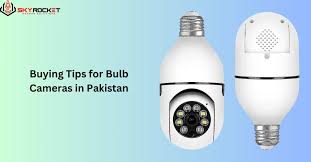

As home security technology continues evolving at a rapid pace, light bulb cameras have become one of the most popular and innovative smart surveillance solutions on the market. Unlike traditional CCTV systems that require complicated wiring, these modern devices fit directly into a standard light socket — providing homeowners with an extremely convenient, discreet, and effective way to monitor their property.
In 2025, the demand for light bulb cameras has exploded thanks to increasing concerns about burglary, package theft, home intrusions, and general safety. Their simple installation, 360-degree view, Wi-Fi connectivity, and smartphone integration make them ideal for both tech-savvy users and complete beginners.
This comprehensive 3,000-word guide explores everything you need to know about light bulb cameras, including how they work, their benefits, key features, installation tips, best models, pros and cons, and how they compare to traditional home security systems.
- What is a Light Bulb Camera?
A light bulb camera is a smart surveillance device that looks like a regular LED light bulb but contains:
A built-in security camera
A motion sensor
Wi-Fi connectivity
Infrared night vision
Two-way audio
Local or cloud storage
It is designed to screw directly into a standard E26/E27 light bulb socket, making installation extremely simple. Once connected to power, the camera pairs with a mobile app, allowing the user to watch live video, receive alerts, and control recording settings.
The camera is hidden inside the bulb-like housing, making it discreet and difficult for intruders to detect.
- How Does a Light Bulb Camera Work?
A light bulb camera operates on the principle of plug-and-play smart surveillance.
Here’s how it works:
- Installation Into a Light Socket
You screw the device into a light socket like a regular bulb — porch light, hallway ceiling, garage, or backyard fixture.
- Power On
Once connected, it powers up automatically using the same electrical supply as a light bulb.
- Wi-Fi Synchronization
Through the mobile app (such as Tuya, V380, iCSee, or a brand-specific app), the camera connects to your home Wi-Fi network.
- Video Recording
The built-in camera captures:
Full HD or 4K video
360-degree panoramic view
Motion-triggered clips
Night vision footage
- Mobile Alerts
When motion is detected, the camera sends real-time notifications to your smartphone.
- Two-Way Audio
Most models include speakers and microphones for:
Talking to visitors
Warning intruders
Communicating with pets
Listening to sounds in the monitored area
- Storage Options
Light bulb cameras store footage via:
MicroSD card
Cloud subscription
Local DVR (rare)
This makes them highly flexible and user-friendly.
- Key Features of Modern Light Bulb Cameras
Modern light bulb cameras offer advanced features that rival expensive CCTV systems.
- 360-Degree Panoramic View
Using a fisheye lens or motorized rotation, these cameras capture wide-angle footage, reducing blind spots.
- Motion Detection Technology
AI-enhanced sensors can differentiate between:
Human movement
Pets
Vehicles
Objects blowing in the wind
This reduces false alarms.
- Full HD / 2K / 4K Video Quality
High-resolution footage ensures clarity for identifying faces, license plates, or details.
- Wi-Fi Connectivity
Allows:
Remote viewing
Cloud backup
App control
- Two-Way Communication
Useful for talking to delivery personnel or protecting your home from anywhere.
- Color Night Vision
Advanced models use infrared + low-light technology to deliver bright nighttime footage.
- Smart Home Integration
Compatible with:
Alexa
Google Home
Smart lights
Security hubs
- Motion-Tracking Feature
Some cameras automatically rotate to follow movement.
- Alarm Siren
Built-in sirens scare away intruders when triggered.
- Light Functionality
Some cameras double as functional LED lights — allowing the device to blend in seamlessly.
- Advantages of Light Bulb Cameras
- Easy Installation
No drilling, no wiring, no tools.
Anyone can install the device in less than 1 minute.
- Affordable
Much cheaper than traditional CCTV systems.
- Discreet Appearance
Looks like a regular bulb — ideal for hidden surveillance.
- Versatile Placement
You can install them:
On porches
In garages
In hallways
On ceilings
In shops
In backyard fixtures
In stores or offices
- Remote Access From Anywhere
You can monitor your home while traveling, working, or on vacation.
- Ideal for Renters
No permanent modifications required; perfect for apartments.
- 360° Coverage Without Multiple Cameras
One bulb camera can replace 2–3 traditional cameras.
- Low Energy Consumption
LED-based systems consume minimal electricity.
- Disadvantages of Light Bulb Cameras
- Requires Constant Power
If the light fixture switch is turned off, the camera stops working.
- Depends on Wi-Fi
Weak Wi-Fi = poor video quality or disconnections.
- Not Weatherproof (in some models)
Many models are for indoor use only unless rated IP65 or higher.
- Limited Zoom Range
Digital zoom is not as strong as professional CCTV systems.
- Potential Privacy Concerns
Always place cameras in legal, private areas — not in bathrooms or bedrooms.
- Best Places to Install a Light Bulb Camera
Indoor Locations
Hallways
Living room corners
Staircases
Home entrances
Garage interior
Basement
Outdoor Locations
Porch light socket
Backyard fixture
Driveway light
Patio ceiling
Shops and small businesses
Always ensure the socket is covered or weather-rated for outdoor use.
- Step-by-Step Installation Guide
Installing a light bulb camera is extremely simple. Follow these steps:
Step 1: Turn Off the Power
Turn off the switch or breaker for safety.
Step 2: Screw in the Camera
Place the bulb camera into a standard E26/E27 socket.
Step 3: Turn the Power On
The camera should power up — lights may flash indicating setup mode.
Step 4: Download the App
Common apps include:
V380
iCSee
Tuya Smart
YCC365 Plus
Use the app recommended in your camera’s manual.
Step 5: Connect to Wi-Fi
Select your Wi-Fi network and enter the password.
Note: Most cameras only support 2.4GHz Wi-Fi.
Step 6: Complete Setup
Allow the camera to scan the QR code from your phone or auto-sync.
Step 7: Adjust Camera Settings
Customize:
Motion sensitivity
Alarm notifications
Recording mode
Night vision
Two-way audio
Step 8: Test the Camera
Walk in front of it to test motion detection and video quality.
- Comparison: Light Bulb Camera vs CCTV vs Smart Cameras
Feature Light Bulb Camera Traditional CCTV Smart Security Camera
Installation Very easy Complex wiring Easy
Cost Low High Medium
Visibility Discreet Visible Visible
Night Vision Good Excellent Good
Coverage 360° Narrow Wide
Power Dependence Always connected Hard-wired Battery/plug
Ideal For Homes/shops Large buildings Homes/apartments
Light bulb cameras are best for convenience and 360° coverage, not for high-security environments like banks or warehouses.
- Types of Light Bulb Cameras
- Fixed Lens Bulb Cameras
Provide wide-angle view without rotation.
- Motorized 360° Rotating Cameras
Offer pan, tilt, and zoom functions through mobile apps.
- High-Resolution 4K Bulb Cameras
Offer superior clarity for wide areas.
- Outdoor Waterproof Bulb Cameras
Designed to withstand rain, dust, and heat.
- Solar-Powered Light Bulb Cameras
Use solar panels for continuous power (emerging technology).
- Most Popular Brands of Light Bulb Cameras (2025)
Some leading brands include:
LaView
Ring (in integrated fixtures)
V380
Tuya-compatible devices
IGENJUN
Blink bulb camera hybrids
XVIM
SYMYNELEC
BOIFUN
While many lesser-known brands exist, always choose one with:
Strong app support
Regular firmware updates
Good customer reviews
- How to Choose the Best Light Bulb Camera (Buying Guide)
- Resolution
HD (720p): Budget, low clarity
Full HD (1080p): Standard
2K / 4K: Best for details and large spaces
- Night Vision Quality
Ensure it has:
Infrared LEDs
Full-color night mode
- Motion Detection Sensitivity
Look for AI-based human detection.
- Pan/Tilt Functions
A motorized 360° camera is ideal for covering large areas.
- Storage Options
Choose a model supporting:
MicroSD card (64–256 GB)
Cloud storage
- App Reliability
Good software = fewer issues.
- Audio Quality
Check for:
Clear microphone
Loud speaker
- Weather Resistance (if outdoor)
Look for IP65/IP66 rating.
- Power Consumption
LED bulbs use less electricity than halogen-based designs.
- Installation Compatibility
Make sure your socket supports E26/E27.
- Security and Privacy Concerns
- Hacking Risks
Use strong passwords and avoid public Wi-Fi networks.
- App Permissions
Disable unnecessary permissions to protect privacy.
- Check for Firmware Updates
Manufacturers often add security patches.
- Legal Compliance
Do not place cameras in areas with expected privacy such as:
Bathrooms
Bedrooms
Changing rooms
Always inform guests if recording is active.
- Light Bulb Cameras for Shop Owners & Small Businesses
Small businesses benefit from light bulb cameras because:
They deter theft
They monitor cash counters
They provide after-hours security
They are cheap to install
They require no wiring or contractors
Retail shops especially use them for monitoring customers discreetly.
- Light Bulb Camera for Outdoor Use
When choosing outdoor models, ensure:
Weatherproof rating
Long-distance night vision
Strong lighting
High-resolution video
Durable build
Ideal installation locations include:
Driveways
Backyard ceilings
Garage entrances
Storefronts
- Cloud Storage vs SD Card: Which Should You Choose?
Cloud Storage
Pros:
Accessible anywhere
Auto-backup
Secure
Cons:
Subscription fee
SD Card Storage
Pros:
No monthly cost
Easy to remove
Cons:
Can be stolen or damaged
Best option: Use both for maximum security.
- Maintenance Tips
To keep your light bulb camera in top condition:
Clean the lens monthly
Update firmware regularly
Check SD card storage
Maintain strong Wi-Fi signal
Test motion detection occasionally
- Use Cases of Light Bulb Cameras
- Home Security
Protecting entrances, hallways, backyards, and garages.
- Elderly Monitoring
Check on elderly family members remotely.
- Baby Monitoring
Some people use them as baby monitors (in legal areas).
- Pet Monitoring
Watch pets while away from home.
- Vacation Security
Monitor your property when traveling.
- Office Surveillance
Ideal for small businesses and home offices.
- Are Light Bulb Cameras Worth It?
Yes — for most homeowners, renters, and small businesses, light bulb cameras provide:
Excellent value
Simple installation
Wide coverage
Reliable security features
Affordability
They are not meant to replace large-scale professional CCTV systems but are perfect for everyday home and office surveillance.
Conclusion
Light bulb cameras represent one of the most innovative advancements in modern home security. With their blend of simplicity, affordability, 360° coverage, and smart features, they offer a powerful solution for anyone looking to improve their home or business surveillance in 2025.
Whether you need to protect your family, monitor your shop, or keep an eye on pets while you’re away, these devices deliver impressive performance without requiring technical skills or expensive installation services.
As smart security continues evolving, light bulb cameras are likely to remain a leading choice for easy, effective, and discreet monitoring solutions.